APK.GOLD
Apk files for Android
Short info
In general apk file Android Auto has rating is 8.3 from 10. This is cumulative rating, most best apps on google play store have rating 8 from 10. Total reviews in google play store 6297612. Total number of five star reviews received 3979264. This app has been rated like bad by 773093 number of users. Estimated number of downloads range between 10,000,000,000+ downloads in google play store Android Auto located in category Auto & Vehicles, with tags google and has been developed by Google LLC. You can visit their website http://g.co/daydream or send apps-help@google.com to them. Android Auto can be installed on android devices with 6.0(Marshmallow)+. We provide only original apk files. If any of materials on this site violates your rights, report us You could also download apk of Android Auto and run it on android emulators like bluestacks or koplayer. Versions of Android Auto apk available on our site: 18.1.664447-release, 18.1.664444-release, 18.1.664443-release, 18.0.664267-release, 18.0.664264-release and others. Last version of Android Auto is 18.1.664447-release was uploaded November 28, 2026
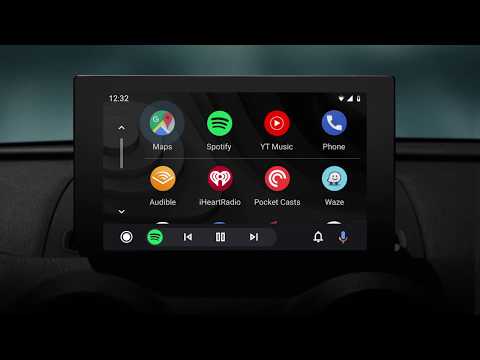
Screenshots of Android Auto
  • Android Auto
  • Android Auto
  • Android Auto
  • Android Auto
  • Android Auto
  • Android Auto
  • Android Auto
  • Android Auto
  • Android Auto
  • Android Auto
  • Android Auto
  • Android Auto
  • Android Auto
  • Android Auto
  • Android Auto
  • Android Auto
  • Android Auto
Description of Android Auto (from google play)

Android Auto is your smart driving companion that helps you stay focused, connected, and entertained with the Google Assistant. With a simplified interface, large buttons, and powerful voice actions, Android Auto is designed to make it easier to use apps that you love from your phone while you’re on the road.

Just say “Ok Google” to...
• Route to your next destination using Google Maps or Waze with real-time GPS navigation and traffic alerts.
• Get updates on your route, ETA, and hazards in real-time.
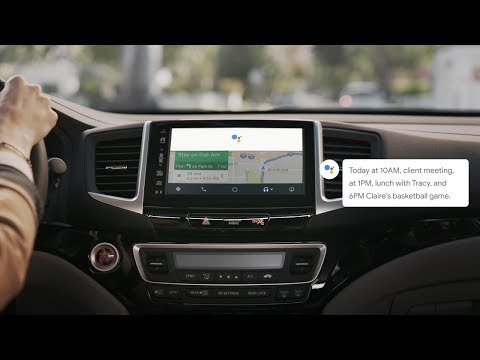
• Have the Google Assistant check your calendar for you so you know where you need to be.
• Set reminders, get updates on the news, and check last night’s score.
• Avoid distractions while driving by setting a custom do not disturb message while driving.
• Make calls using Google Assistant and answer incoming calls with just a tap.
• Access your contacts folder and send and receive messages with the Google Assistant using SMS, Hangouts, WhatsApp, Skype, Telegram, WeChat, Kik, Google Allo, and many more messaging apps.
• Manage your infotainment system like never before. Listen to your favorite media apps including Spotify, Pandora, iHeartRadio, Google Play Music, Amazon Music, SiriusXM, TIDAL - High Fidelity Music Streaming, Napster Music, and Deezer. Many more music, radio, news, sports news, audiobook, and podcast apps are also supported.

The number of compatible apps is always growing! For a full list of compatible apps, go to http://g.co/androidauto

To use Android Auto, you’ll need a phone running Android 6.0 or higher and an active data connection.
Over 400 car models now support Android Auto! To find out if your car display is compatible and how to enable it, check your owner’s manual or contact your car’s manufacturer. Once enabled, use a high quality USB cable to connect your phone to your car, then launch Android Auto to get going!
Learn more about Android Auto and compatible cars at http://android.com/auto
For support: http://support.google.com/androidauto
Get help from our community: https://productforums.google.com/forum/#!forum/android-auto

Version history Android Auto
New in Android Auto 18.1.664447-release
What's new?
• Bug fixes and other improvements.
• We want to hear from you! Join the conversation in our community https://g.co/androidautocommunity
Advertisement
Please rate this app
More info
Select the Android Auto APK that fits your device

PermissionsAndroid Auto 18.1.664447-release

High-risk access inside

  1. No alerts
  2. Worth checking
  3. High risk

Alerts

High risk (2)

  • Notification accessnotification-listenerReads all notifications, including login codes
  • SMSSEND_SMSSMS may contain bank and login codes

Worth checking (6)

  • Display over other appsSYSTEM_ALERT_WINDOWDraws on top of other apps
  • All files accessMANAGE_EXTERNAL_STORAGEReads and changes all files in storage
  • Modify system settingsWRITE_SETTINGSChanges brightness, ringtone and other settings
  • Call logREAD_CALL_LOGSees incoming and outgoing calls
  • Incoming SMSRECEIVE_SMSReads incoming SMS
  • Installed apps listQUERY_ALL_PACKAGESGets the list of all installed apps

40 permissions in total

Source: AndroidManifest.xml of this APK

Switched on in Settings4
  • INTERACT_ACROSS_PROFILES
  • All files accessCan read, change and delete all files in the phone storage.
  • Display over other appsCan appear on top of other apps or other parts of the screen. This may interfere with normal app usage.
  • Modify system settingsAllows the app to modify the system's settings data. Malicious apps may corrupt your system's configuration.
Needs your OK15

Microphone

  • Record audio

Location

  • Access approximate location only in the foreground
  • Access precise location only in the foreground

Contacts and accounts

  • Read your contacts

Phone

  • Directly call phone numbers
  • Read phone status and identity

Call logs

  • Read call log

SMS

  • Receive text messages (SMS)
  • Send and view SMS messages

Calendar

  • Read calendar events and details

Nearby devices

  • Access local network devices Android 17+
  • Connect to paired Bluetooth devices
  • Discover and pair nearby Bluetooth devices
  • Interact with nearby Wi‑Fi devices Android 13+

Notifications

  • Show notifications Android 13+
Given at install21
  • Access Bluetooth settings
  • Access Do Not Disturb
  • Change network connectivity
  • Connect and disconnect from Wi-Fi
  • Control vibration
  • Have full network access
  • Observe companion device presence
  • Pair with Bluetooth devices
  • Prevent phone from sleeping
  • Query all packages
  • QUERY_ADVANCED_PROTECTION_MODE Android 16+
  • Read Google services configuration
  • Run at startup
  • Run foreground service
  • Run foreground service with the type "connectedDevice" Android 14+
  • Run foreground service with the type "location" Android 14+
  • Run foreground service with the type "microphone" Android 14+
  • See mobile network type and SIM status Android 13+
  • Use biometric hardware
  • View network connections
  • View Wi-Fi connections

Device must have

  • USB accessories

Permission changes

The list has not changed since version 18.0.664263-release.

Android Version Requirements for Android Auto

How the minimum Android version needed by Android Auto has changed across the versions in the apk.gold catalog. Tap a point on the chart to check a specific version.

18.1.664444-releaseNov 28, 2026Android 12L+, target 17
Minimum AndroidTarget Android

The current Android Auto 18.1.664444-release runs on Android 12L and later and targets Android 17. In 2023, version 7.4.620967-release needed only Android 6.0.

Phone on an older Android? Newest versions that still work: Android 10: 18.0.664267-release (Nov 2026); Android 6.0: 7.4.620967-release (Jan 2023).

Other Android Auto APK versions for android 12
Popular android apps